1. Always send API logs (request and response) in JSON format as an attachment.
2. Follow the integration process as provided in the Pathway documentation.
http://dealint.tboair.com/APIDocument/Pathway.aspx
3. Generate a single token per day, as it is valid for 12 hours (from 00:00 AM to 11:59 AM). Do not generate a new token with each search..
4. The Tracking ID is valid for 15 minutes only.
Implementations & Suggestions:
1.The client will receive two passwords during API registration: one for API integration and
the other for TBO B2B login. The B2B login can be used to refer to searches or for any other suggestions regarding implementation.
The TBO B2B Login link is available here: TBO B2B Login
2. For domestic bookings, both outbound (OB) and inbound (IB) result indexes will be returned
in the search response. All methods should be called first for OB and then for IB. This will
generate two separate PNRs, one for the outbound journey and another for the inbound journey.
3. For international bookings, only the OB result index will be returned. The segment details will
include information for both the outbound and inbound journeys..
4. Additional SSR (Special Service Request) options such as Meal, Baggage, or Seat can only be availed for
LCC (Low-Cost Carrier) flights. The SSR details must be passed in the ticket request, derived from the SSR
response, to avail these services. For GDS (Global Distribution System) flights, meals and seats will be
provided free of charge, if the airline provides these services. SSR must be passed in the book request
from the SSR response to avail these services.
5. Baggage, meal, and seat arrays should not be passed as null. Additionally, baggage and seat requests
cannot be made for infant passengers.
6. For LCC flights, meal and seat requests should be passed dynamically in an array.
7. For non-LCC flights, meal and seat details should be passed as strings.
8. During the integration process, if SSR is being implemented, the most recent method called before
ticketing should be SSR. If SSR is not updated, the previous SSR request will not be considered during ticketing,
leading to errors such as invalid meal, baggage, or seat requests.
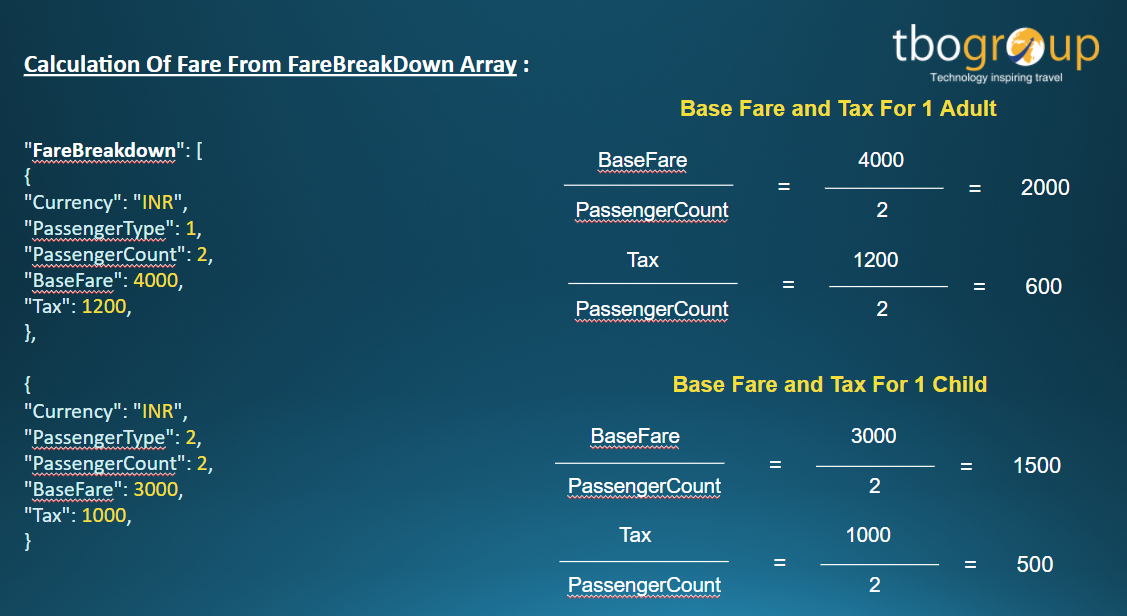
9.Fares in the ticket request should be taken from the fare quote response,
specifically from the fare breakdown array.
Below is the example of calculation understanding:
If Base Fare received is 4000 and passenger count is 2 irrespective pax type then divide 4000
by 2 and then pass 2000 for each passenger in ticket request and the same process needs to
be followed for the tax node.
Pricing Formula:
Published Fare: Published fare is the price which agency will charge from end
customer, if agency wants to add any additional markup then they can add same at their end.
Formula: BaseFare + Tax + OtherCharges + ServiceFee + AdditionalTxnFeepub +
AirlineTransFee
Offered Fare: Offered Fare is the price which is provided by airline after deduction
of only commission.
Formula: Published Fare-CommissionEarned-PLBEarned
Net Payable: Net Payable is the fare which is payable to TBO by agency.
10. If a PNR is generated and an error occurs in the ticket method from the supplier,
send the logs. It will be considered in the certification process if the error is from
the supplier's side.
11. The Book and Ticket methods should only be used for Non-LCC airlines.
12. The Ticket method is only for LCC airlines.
13. The amount is deducted from the agency wallet once the ticket is generated.
There is no payment gateway from our side; the client must implement it.
14. Check the FareQuote response to determine if the passport is mandatory or not.